
piros365's blog
Post is on which tool best to change KM in BMW FEM BDC system? and how to do?
Tools Option:
Xhorse VVDI2 (Pay extra money for BMW FEM/BDC authorization)
Yanhua FEM/BDC Programmer V1.4
BMW Explore
Guide:
- How to use Xhorse VVDI2 to change KM in BMW FEM BDC?
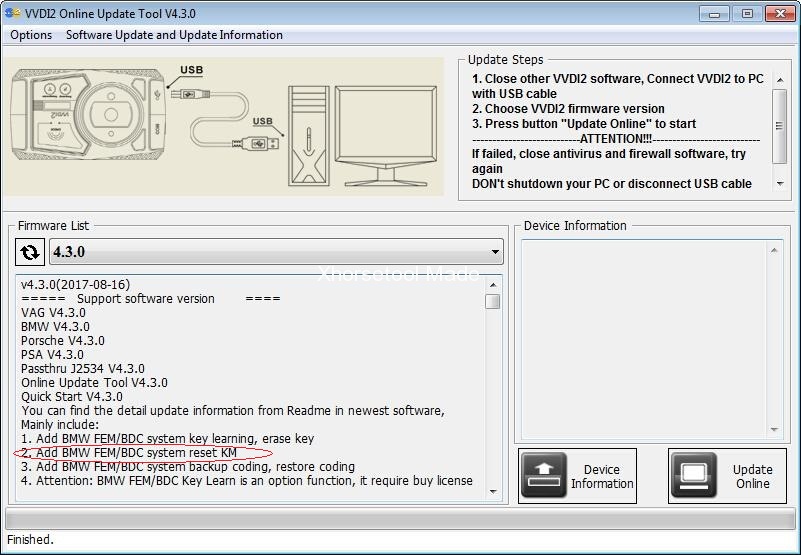
Xhorse VVDI2 V4.3.0 supports reset FEM/BDC KM(cluster require reset manually).
VVDI2 V4.3.0 download free:
https://mega.nz/#!W1pSRRTL!0n8OX4wshaB1s0O06SDhTR0KvO32nPHZWg4CQjBMdrA
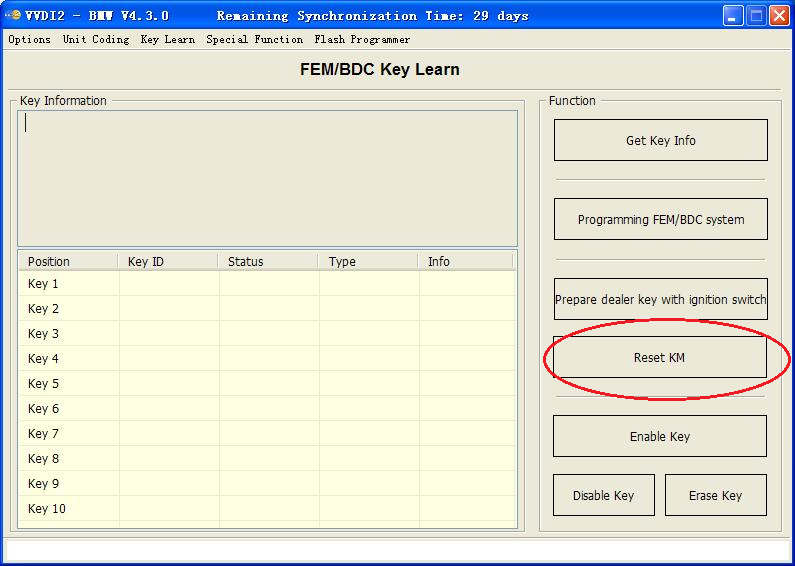
How to Reset KM in FEM/BDC system?
Just follow the steps on the screen if you have no idea.
Price: Extra 600-800dollars to authorize FEM/BDC.
- Guide: BMW FEM BDC KM reset with Yanhua FEM/BDC Programmer V1.4
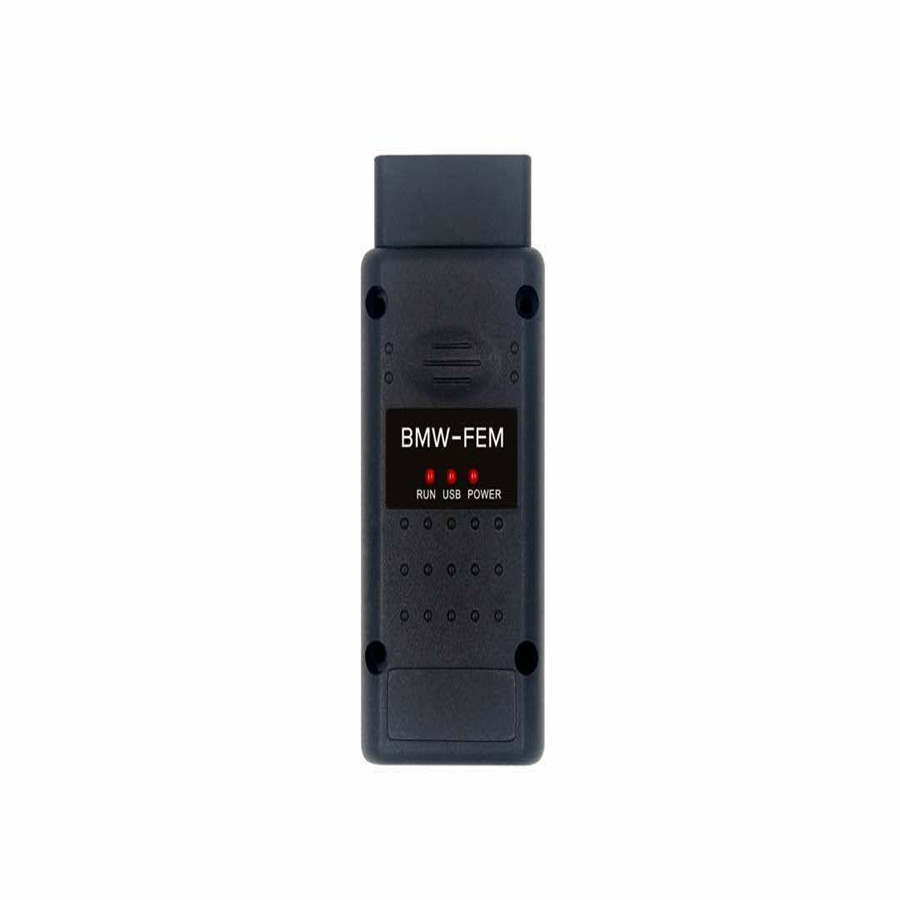
Since Yanhua FEM/BDC Programmer V1.4 update, KM reset is working.
Yanhua FEM/BDC Auto Key Programmer source:
http://www.fobdii.com/wholesale-509-yanhua-bmw-fem-key-programmer.html
& software V1.4 with FEM BDC KM reset download:
http://www.autoecu.com.cn/download/page.do
OS: XP/Win7/Win10
Files contained:

Using tips:
The software and hardware must update all!!!
The step as follow:
- install BMW_FEM_BDC_EN_V1.0.4.msi
- run BMW_FEM_BDC.exe
- click “Upgrade adapter”, select the upgrade file: BMW-FEM-V14.bin
- follow the tip, wait for upgrade complete
I made a definitive guide of how to set up DHCP server on an external router for BMW ECU flashing with BMW ICOM diagnostic tool.
Why is this necessary?
When flashing specific modules (KOMBI, NBT,..) on F and G series, the
ICOM switches between different IP addresses and therefore loses sync with the computer. In order to resolve this issue, there needs to be a DHCP server between the ICOM and PC, which redirects any traffic on the selected MAC address (in this case the ICOM’s MAC address) to a specified IP address.
All three connected devices (PC, ROUTER and ICOM incl. icom a1, icom a2, icom next) need to be set to DHCP.
In this tutorial, I used an old D-Link DIR-300 router. You can use any router that supports setting its’ netmask to 255.255.0.0 and has the capability for DHCP server.
Step-by-step instructions:
Before this, you need to turn off your Windows Firewall !
Step 1: Configure your PC to DHCP
Go to Control Panel > Network Connections > Ethernet>Properties
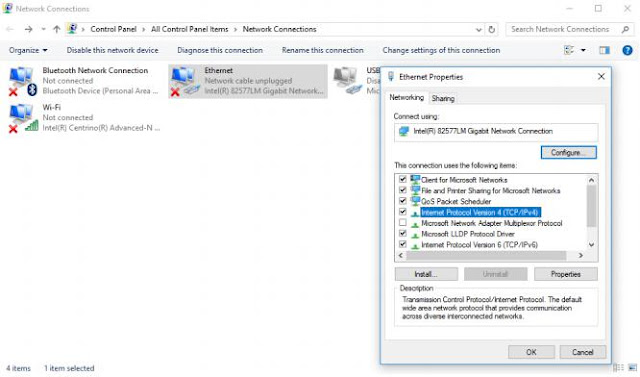
Select: Internet Protocol Version 4 (TCP/IPv4) and click Properties.
Both tabs need to be as follows:
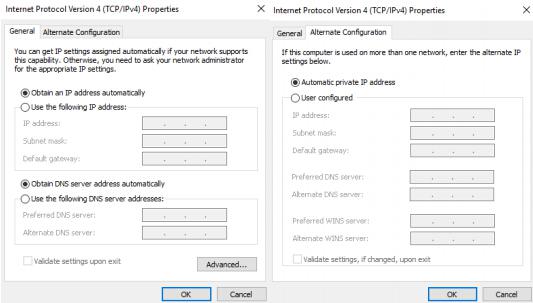
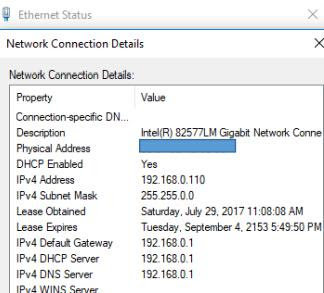
When you now connect something with LAN cable, your Ethernet card under Control Panel > Network Connections > Ethernet>Details should now show DHCP Enabled Yes.
Step 2: Configure your BMW ICOM Software to DHCP
Connect your ICOM to the car’s OBD2 port, wait for it to power on and connect it to your PC via LAN cable. Wait a minute or two to be recognized by the PC.
In iToolRadar or Dr. Gini take a look at your ICOM’s assigned IP address. Copy it into your web browser (I use Google Chrome) and at the end add :60080 (this is the port fort the settings).
Example: http://169.254.97.140:60080/
You will then be asked for a Login username and password.
Username: root Password: NZY11502
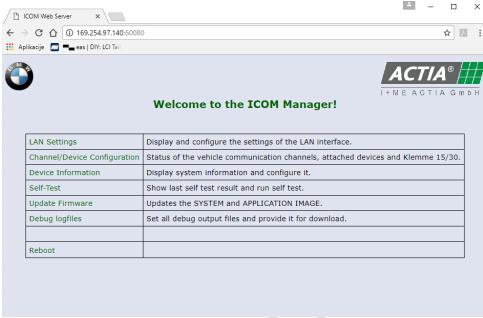
Under LAN settings make sure your ICOM is set to DHCP. Make a note of the ICOM’s subnet mask.
Step 3: Configure your router for DHCP server.
Disconnect ICOM, power up your router and connect it to your PC via LAN cable. Use the router’s LAN ports.
Open Command Prompt (CMD) and type in ipconfig.
You will see a list of your Connection Cards configurations. Under LAN you will see your router’s IP addresses. Copy the Default gateway IP address into your internet browser. This time you do not add any port number at the end. P.S.: If there is no Default gateway listed, make a hard reset of your router with its’ physical reset button.
Type in the username and password of your router. The default username is usually admin and the password is either nothing/blank or also admin.
Now go under advanced and turn off your router’s firewall. In my case it is under ADVANCED>Firewall&DMZ. Disable SPI, save settings.
Then go to LAN settings and assign 192.168.0.1 with subnet mask
255.255.0.0 to your router.
Important: The subnet mask of the router needs to match ICOM’s subnet mask. Enable DHCP server.
Set the pool to be between 100 and 199.
Save settings and reboot your router.
The DHCP Client list should now be populated with your PC’s address. If not, physically power off and on your router (maybe also PC), then check again.
Settings should look like this:
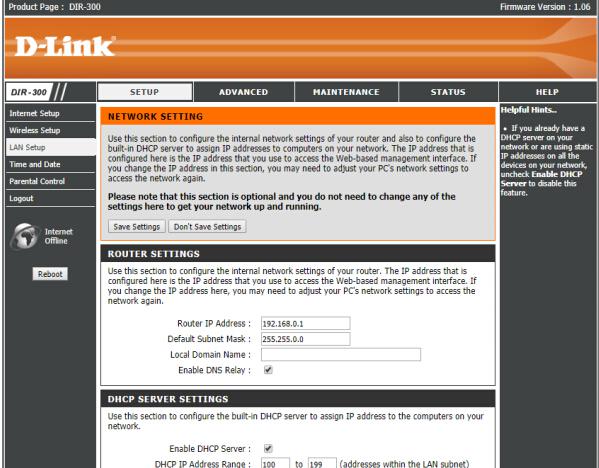
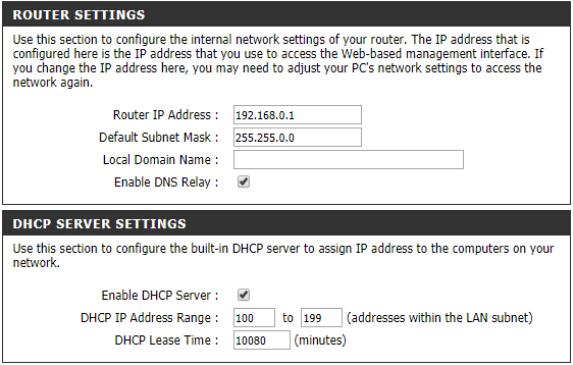
And your PC listed under DHCP client List.
Step 4: Connect everything together
Power off your router, disconnect it from your PC, disconnect your ICOM from the car and LAN. No device should be connected via LAN to anything at this point and both router as well as ICOM should be powered off.
Follow this exact order:
Power on your router. Wait 2 min for it to fully boot up.
Connect ICOM to the car’s OBD2 port and wait for it to fully boot up. Connect ICOM to the router via LAN cable. Use the LAN ports on the router (port number does not matter). Wait a minute or two.
Connect your PC to the router via LAN cable. Use the LAN ports on the router (port number does not matter). Wait for the PC to recognize the router.
In web browser connect to your router’s settings menu as described in step 3. Take a look at the DHCP Client list under LAN settings. Your ICOM and PC should be listed.
Open iToolRadar or Dr. Gini and you should see your ICOM listed with an IP address of 192.168.0.x, where x is a number between 100 and 199.
This is it. You can now open ISTA/D and run a vehicle test with your BMW ICOM A3 Pro+. If ISTA/D recognizes your vehicle fully, you are all set. If not, there is a problem and you should not attempt to flash anything.
Good reference may help you out:
How to setup router for Programming KOMBI and NBT
Router DHCP, Icom DHCP and Windows Ethernet: automatic dhcp
First of all the ICOM should be configured this way:
ICOM Config
ConnectionMode = STATIC_IP
Ip = 192.168.68.85
Netmask = 255.255.255.0
Gateway = 192.168.68.99
DHCPSRV.INI
[SETTINGS]
IPPOOL_1=192.168.68.1-254
IPBIND_1=192.168.68.99
AssociateBindsToPools=1
Trace=1
DeleteOnRelease=0
ExpiredLeaseTimeout=3600
[GENERAL]
LEASETIME=86400
NODETYPE=8
SUBNETMASK=255.255.255.0
NEXTSERVER=192.168.68.99
ROUTER_0=192.168.68.1
[DNS-SETTINGS]
EnableDNS=0
[TFTP-SETTINGS]
EnableTFTP=0
ROOT=C:\Users\Osx\Desktop\DHCP\wwwroot
WritePermission=0
[HTTP-SETTINGS]
EnableHTTP=0
ROOT=C:\Users\Osx\Desktop\DHCP\wwwroot
[00-01-A9-00-EE-E9]
IPADDR=192.168.68.1
AutoConfig=06/26/2016 12:41:32
Hostname=ICOM1120134
LeaseEnd=1467070189
Windows Ethernet config:
“Use the following IP Address”
IP 192.168.68.99
Subnet mask 255.255.255.0
Hope this help.
Have Toyota Land Cruiser Prado 2016 remote key, firstly use SKP1000 programmer to match 72 (with G) 433MHZ, then match the remote key manually
Chip model: 72 (with G)
remote control frequency: 433MHZ
Unlock direction: Clockwise
Key embryo: NO. 02
OBD position: under the steering wheel
Comes with another NO.1 & NO.2 ignition lock
Able to copy
No need Pin code
The remote control is able to generate
Chip maker: SKP1000 tablet key programmer
Remote control match tool: manually
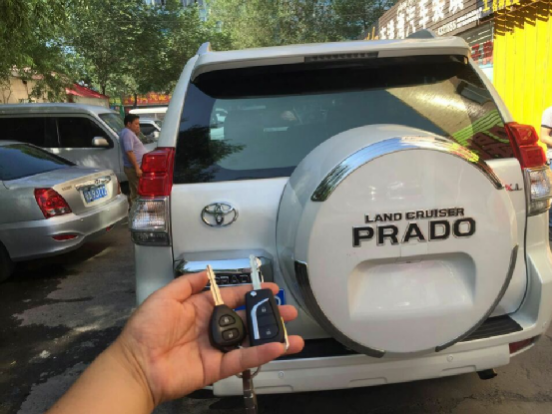
Here we go!
Part 1: Chip 72 (with G) 433MHZ match with SKP1000 programmer
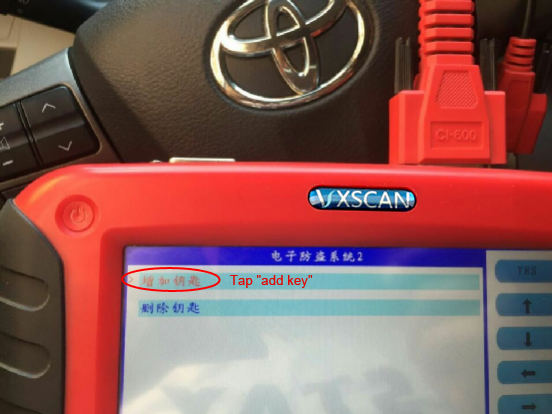
Tap ” Toyota” then “Immobilizer system 2”
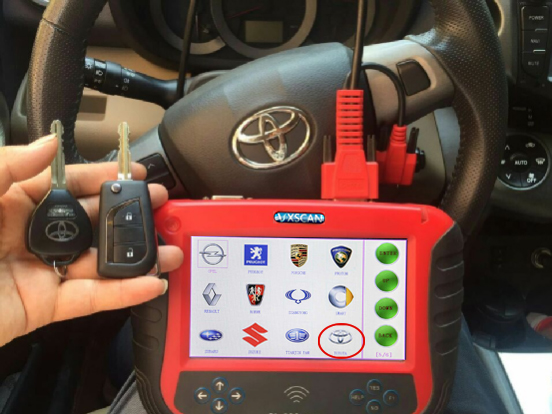
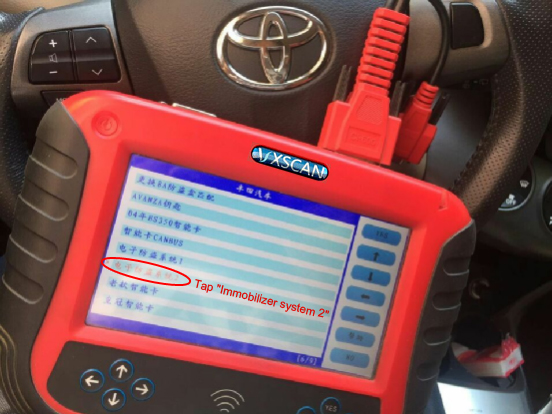
Please choose: OBDII socket, and turn on the ignition, press “Yes” to continue, and “NO” to back.

Tap “add key”
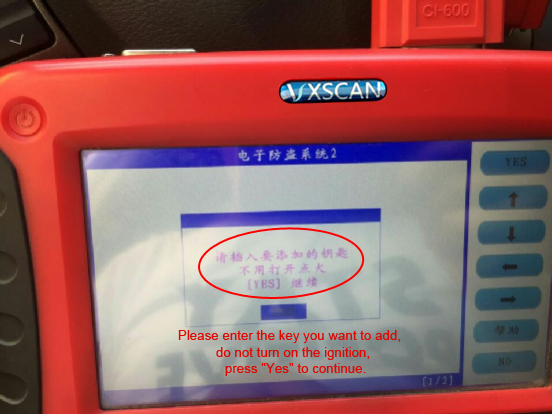
Please enter the key you want to add, do not turn on the ignition, press “Yes” to continue.
Wait until the immobilizer indicator light turn off, the chip 72(with G) match successfully, press “NO” to back.

Part 2: Remote key match manually
Procedure:
- Close all car doors, insert the key, open the main door, pull out the key.
- Insert the key into the ignition and pull out for two times.
- Close and open the side door for two times.
- Insert the key into the ignition and pull out for one time.
- Close and open the side door for two times.
- Insert the key into the ignitionswitch, close the door.
- the ignitionswitch ON-OFF for one time is the “add” mode, ON-OFF for two time is the “Reset” mode.
- Pull out the key from the ignition switch, at this time the door lock should move for 2 times, meanwhile hold the “LOCK” and “UNLOCK” buttons for one second then release, after 1 second repeat the same action. At this time, the central lock will automatically unlock and lock for one time. Move for one time means success and for two times means failure.
- Reset the other remote control, repeat the step 8.
If failure manually, recommend CI-pro to match the remote key.
http://www.fobdii.com/wholesale-488-skp1000-tablet-auto-key-programmer.html
XTUNER T1 diagnostic adapter Feedback on Caterpillar Trucks (with Pics)
XTUNER T1 is newly released heavy-duty trucks scanner,Complete function capability including DTC, DTC freeze Info, Live data, Actuation test and Special function.Windows XP/7/8/10 operating systems allows for more stable performances, better compatibility and expandability.

Finally I have time to write down what XTUNER T1 diagnostic adapter can work on Caterpillar Trucks after a long day outdoor in the 35ºC weather.
Seeing is believing, here 7 photos what I took today.


XTUNER T1 diagnostic adapter Feedback on Caterpillar:
ModelSystemECU InfoDTCDTCFreezeData
List320CPump ControlOKOK OK320CMonitorOK 320DEngine(C6_4)OKOK OK320DMachine ControlOKOK OK320DProduct LinkOKOK OK320DMonitorOK 320DEngine(C6_4)OKOK OK320DMachine ControlOKOK OK320DProduct LinkOKOK OK320DMonitorOK OthersPump ControlOKOK OKOthersEngine(C6_4)OKOK OKOthersMachine ControlOKOK OKOthersProduct LinkOKOK OK
I will update more pictures or videos here.
XHORSE VVDI Key Tool Remote Maker English language
Xhorse VVDI Key Tool remote maker supports most common remote types in the market; it is reliable and easy to use.

Software Version: V2.3.9
Hardware/Firmware Version: V2.0.2
How to use VVDI Key Tool:(Here take Generation of MG3 433 Remote Key for example)
1.Open VVDI Key Tool remote maker, select “Remote Generation”
2.Select vehicle country/ region,i.e China
3.Select Vehicle Make:MG
4.Select model: Old MG3 433
5. Connect VVDI key tool with vvdi mini remote programmer, click on generate
6.Select corresponding remote type, wireless or wire remote
7. After select generation remote, vvdi key tool will generate barcode automatically , take a photo of the barcode
8.Use decode device to decode the remote key with the barcode.
The new generated remote is almost the same as original remote with barcode